
PureLink:Phone&Location Track
easysoftTools
4.5109.00 Reviews
- Version
- 1.3.3
- Installs
- 1.00M
- Age Rating
- Everyone
Screenshots
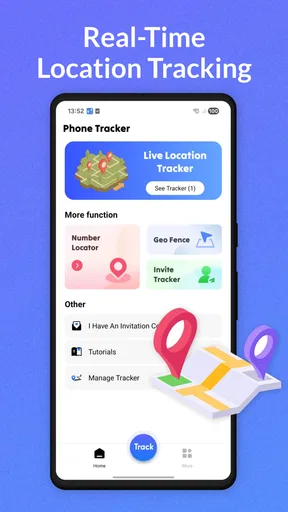
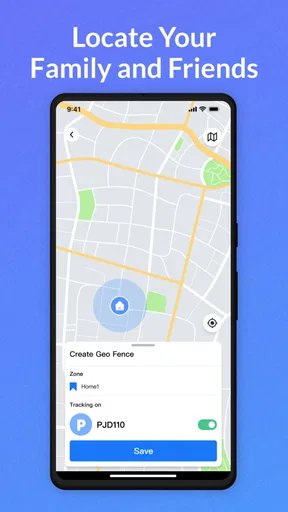
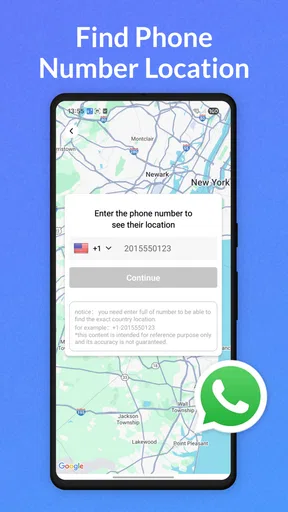
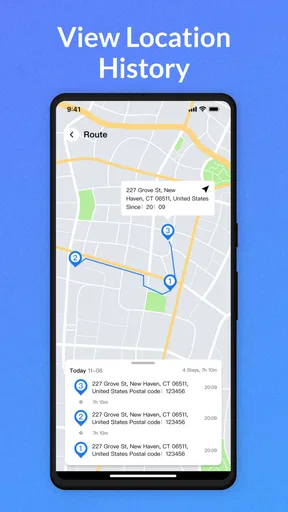
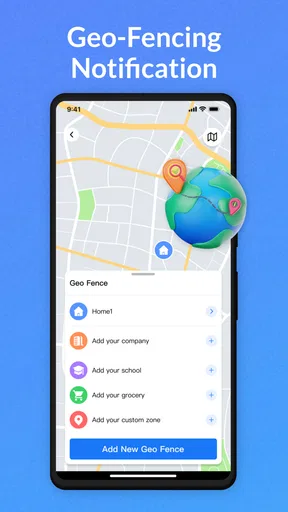
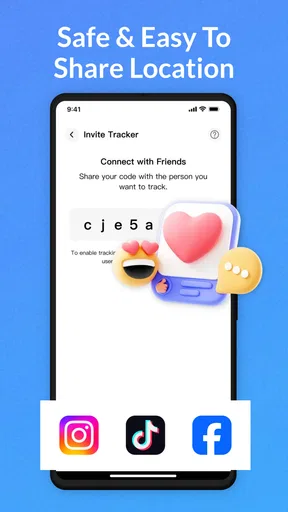
Our Review of PureLink:Phone&Location Track
 Analysis by Appyee
I tried PureLink: Phone & Location Track as a practical sharing tool rather than treating it like a full communication platform. Its central idea is easy to understand: make it simpler to pass along phone and location details when a normal conversation becomes unnecessarily awkward. That makes it most interesting in the small moments where people need the right contact or place information quickly, not when they are looking for messaging, navigation, or a complete family-safety system.
PureLink comes from easysoft and sits in the Tools category. It is free to install, aimed at Everyone, and works on devices running Android 8.0 or later. The current version is 1.2.9, while the app has reached over 500 thousand installs and holds a 4.5 average from around 5.1 thousand ratings. Those figures suggest that the basic sharing problem is familiar to many people, although they do not change the fact that the app’s usefulness depends heavily on how often you exchange this kind of information.
From a messy request to a usable shared detail
I look at this section as the moment a vague request becomes something another person can act on: a contact detail or a place, shared with enough context to avoid guesswork. The useful habit is to decide what the recipient needs before opening another app, then keep the handoff focused. That simple boundary makes the next step—choosing how to share—much easier.
The starting condition: information is available, but not convenient
A realistic use case is arranging to meet someone in an unfamiliar area. One person has a phone number, a location, or both, but copying the details into a message can introduce mistakes. A digit may be missed, a location may be described vaguely, or the recipient may have to switch between several apps before understanding what was sent. PureLink is designed for that gap between having information and handing it over cleanly.
I found the concept most useful when the sender and recipient already know each other and simply need a direct exchange. Think of a friend waiting near a large venue, a relative asking where to collect you, or a colleague who needs a reliable contact detail while moving between appointments. In those situations, the value is not entertainment or discovery. It is reducing the number of little actions between the request and a clear answer.
That distinction matters. This is not an app I would choose as a replacement for a normal chat service. A messenger is better when the conversation itself is important, when several people need to respond, or when you need a long record of planning. A navigation app remains better for route guidance, traffic information, and turn-by-turn movement. PureLink makes more sense as a focused handoff tool between those larger activities.
Step one: decide exactly what the other person needs
Before opening the app, I would first reduce the request to one clear outcome. Does the recipient need a phone number, a location, or both? This sounds obvious, but it is one of the practical details that determines whether a sharing tool feels helpful or merely adds another screen. Sending more information than necessary can make a simple exchange harder to understand, especially when the recipient is busy or viewing the message on a small display.
For a phone detail, I would check the number before passing it on. For a location, I would confirm that the selected place represents where I actually want the other person to go, rather than assuming that any automatically chosen point will be suitable. A location can be technically correct and still be inconvenient if it leads someone to the wrong entrance, side of a building, or nearby road. PureLink can simplify the handoff, but it cannot replace that human check.
The best habit is to prepare the information before sharing, not after the recipient asks a second question. That small change makes the app feel much more efficient. It also prevents the common problem of sending a location without explaining whether it marks a meeting point, a destination, or the sender’s current position.
Step two: create the handoff
The next part of the workflow is where PureLink earns its place. Instead of treating phone and location details as loose pieces of text, I use the app as a deliberate bridge from the person holding the information to the person who needs it. The process is easier to understand when I think of it as an input, a handoff, and an outcome rather than as another social feed.
For a phone-related exchange, the important advantage is clarity. The recipient should be able to recognize what the shared detail is for without guessing whether it belongs to a business, a family member, or the person sending it. For a location exchange, the same principle applies: the receiver needs enough context to act on the information immediately.
This is also where I would avoid using PureLink casually for every message. If I am already inside a conversation and need to add one sentence of explanation, a regular messenger may be faster. PureLink becomes more persuasive when the information itself is the main object being transferred. That is a useful trade-off: its focused design can reduce clutter, but the focus may feel unnecessary for a quick, informal exchange.
Step three: check the recipient’s side
A sharing workflow is only successful when the other person can understand and use the result. I would therefore treat the recipient’s experience as part of the task, not as an afterthought. Someone receiving a phone detail may want to call or save it. Someone receiving a location may need to open it in a navigation tool or compare it with the instructions already agreed upon.
That handoff is one reason I would not assume PureLink replaces every other app involved. It can make the initial transfer more direct, but the recipient may still rely on a phone app for calling or a map app for movement. In practice, PureLink can sit between the source of the information and the tool used to act on it. This is a strength for users who want a cleaner starting point, but it also means the complete task may still involve more than one application.
For family use, I would be especially careful about wording. Sending a location is not the same as establishing continuous tracking, and a recipient should know what the shared point represents. The app’s name may attract people looking for broad location monitoring, but I would approach it as a sharing utility unless the exact workflow on the device clearly matches a more extensive need. For ongoing supervision or safety features, a dedicated family-location product may be a better fit.
A concrete everyday scenario
Imagine that I am leaving a busy public place and a friend is trying to meet me. A vague message such as “I’m near the entrance” may not be enough when the venue has several doors. I would use PureLink to make the relevant location handoff, then add a short explanation identifying the meeting point. My friend can use the shared detail as the starting point for the next action instead of asking me to describe the same place repeatedly.
The useful part is not just speed. It is the reduction of ambiguity. If the friend is already walking, a clear shared location is more dependable than a paragraph full of landmarks. If the meeting point changes, I would send an updated handoff rather than assume the first one remains accurate. That workflow keeps responsibility clear: I provide the detail, the recipient checks it, and both of us understand that real-world conditions can still require a correction.
A similar process works for a phone exchange. If a relative needs to contact a service provider or another family member, I would share the intended number and identify its purpose. That is safer and more useful than forwarding a contact with no explanation. PureLink helps with the transfer, but the quality of the outcome still depends on the sender selecting the right information.
Where PureLink feels better than the usual alternatives
Compared with copying a number manually, a focused sharing tool can reduce transcription errors and make the exchange feel intentional. Compared with sending a location through a long chat thread, it can keep the important detail from getting buried among unrelated messages. Those are modest advantages, but they are exactly the sort of advantages that matter during a rushed handoff.
Compared with a full navigation app, PureLink is less about finding a route and more about passing the starting point to another person. Compared with a messaging platform, it is less about conversation and more about the object being shared. Compared with a continuous location-monitoring service, it is a narrower choice for people who want to communicate a location rather than maintain an ongoing view of someone’s movements.
That narrower role is important when deciding whether to install it. If your main problem is navigation, choose a map tool. If your main problem is group planning, choose a messenger. If you need persistent family visibility, look for a service built specifically around that responsibility. PureLink is strongest when the problem is a clean, purposeful transfer of phone or location information.
The friction points in the flow
The first point of friction is the extra step. Many Android and iOS users already know how to copy a number, drop a pin, or send a message. If the exchange is very occasional, opening a separate tool may feel slower than using the built-in option. The app has to save enough time or prevent enough confusion to justify becoming part of your routine.
The second issue is context. A shared phone detail without a label, or a location without a clear meeting instruction, can still create questions. PureLink may improve the handoff, but it cannot automatically understand why the recipient needs the information. I would always pair an important share with a short human explanation when the situation is not self-evident.
The third is expectation management. The word “track” in the product name may lead some people to expect permanent monitoring, route history, or a safety dashboard. I would not install it solely on that assumption. For a one-time or purposeful location handoff, the concept fits. For a broader tracking arrangement, users should compare it with an app whose main job is ongoing location management.
There is also a cost consideration. The app is free, but it includes in-app purchases ranging from about seven dollars to about thirty dollars per item. That means I would begin with the free experience and judge whether the workflow solves a recurring problem before paying for anything. A user who only shares a location once in a while may find the free access sufficient, while a frequent user should examine what an upgrade changes before committing.
Who will get the most from it
I can recommend PureLink to people who regularly exchange contact or location details and dislike the small errors that appear when information is copied between apps. It may suit families coordinating pickups, friends meeting in confusing places, and workers who need to pass a useful contact detail without turning the exchange into a long conversation.
It is also a reasonable option for someone who values a simple, purpose-built workflow. The Everyone content rating makes it approachable for a broad audience, and the Android requirement is not especially demanding for users with a device running version 8.0 or later. Still, accessibility in the store does not guarantee that every recipient will find a new sharing method familiar, so I would introduce it gradually rather than expecting everyone in a group to adopt it immediately.
I would skip it if I rarely share phone or location information, if my current messenger already handles these exchanges comfortably, or if I need advanced navigation and persistent tracking. In those cases, PureLink may become another icon to maintain instead of a genuine improvement. The app has a defined job, and it is best judged against that job rather than against every tool in the communication category.
My practical setup for reliable results
My preferred workflow is simple. I first decide whether the recipient needs a contact detail or a place. I then check the information, share only what is relevant, and add a short explanation when the meaning could be misunderstood. Finally, I confirm that the recipient has enough context to act. This sequence avoids treating the app as a magic solution and makes the human handoff part of the design.
For locations, I would be more precise around large buildings, transit areas, campuses, and venues with multiple entrances. For phone details, I would identify the person or purpose so the recipient does not have to guess. If the situation changes, I would send a fresh update rather than relying on an old share. These habits are not flashy features, but they are what turn a basic utility into a dependable part of an everyday routine.
I would also be selective about whom I send location information to. A convenient sharing workflow should not remove ordinary judgment. Before sending, I would verify the recipient and make sure the location is appropriate for the situation. The app can make communication simpler, but the sender remains responsible for choosing the information and the person who receives it.
My ending assessment after following the full workflow
PureLink is a focused Tools app with a sensible purpose: it helps turn phone and location information into a clearer handoff. I like it most when a normal message would be vague, error-prone, or buried in conversation. The workflow from selecting the detail to giving the recipient a usable starting point is easy to understand, and the app’s free entry point makes it straightforward to test without an upfront purchase.
My reservation is that its usefulness depends on a specific kind of need. It does not replace a messenger, a navigation service, or a dedicated ongoing location solution. The extra step can also feel unnecessary for people who already have a comfortable sharing habit. In-app purchases from about seven dollars to about thirty dollars per item make it sensible to evaluate the free experience carefully before spending more.
Overall, I would recommend PureLink to a friend who often says, “Send me your number,” or “Which entrance are you at?” and then ends up repeating the same information. I would describe it as a purposeful handoff tool rather than a complete communication or tracking platform. If that distinction matches your everyday problem, easysoft’s app is worth trying; if your needs are broader, the usual messaging, map, or family-safety alternatives will probably serve you better.
Privacy and Permissions
See what permissions an app requests and how it handles your data.
- Location
- approximate location (network-based), precise location (GPS and network-based)
- Wi-Fi connection information
- view Wi-Fi connections
- Other
- view network connections, full network access, run at startup, control vibration, prevent device from sleeping, Google Play license check
Verdict
Strengths of PureLink:Phone&Location Track
- Simple interface makes location sharing easy to understand.
- Useful for coordinating family members or friends in real time.
- May help locate a misplaced phone when tracking is enabled.
- Location updates can support safer travel and meetups.
- Works as a practical alternative to repeated check-in messages.
Limitations of PureLink:Phone&Location Track
- Continuous GPS use may noticeably reduce battery life.
- Location accuracy can drop indoors or in crowded urban areas.
- Some tracking features may require a paid subscription.
- Sharing location data creates privacy and security concerns.
- The app may need several permissions to work properly.
Similar Picks in This Category
View All
Google LLC4.0

Gboard - the Google Keyboard
Google LLC4.5

Google Play services
Google LLC4.3

Google Play Store
Google LLC4.9

Files by Google
Google LLC4.5

SHAREit: Transfer, Share Files
Smart Media4U Technology Pte.Ltd.4.3
Frequently Asked Questions
What is PureLink: Phone & Location Track used for?
PureLink: Phone & Location Track is designed to help users share and view real-time location information through connected devices or contacts. It may be useful for families, couples, friends, or people coordinating meetups. Before downloading, review the app’s supported features, account requirements, and compatibility with your phone, because location-sharing tools can work differently depending on the operating system and device settings.
Does PureLink require permission to access my location?
Yes, an app that provides location tracking normally requires access to your device’s location services. Depending on the features you enable, PureLink may request permission to use location while the app is open or in the background. You should read each permission prompt carefully and select the least extensive option that still provides the functionality you need. Location access can usually be changed later in your phone’s privacy settings.
Can I track someone’s location without their knowledge or consent?
No. Location tracking should only be used with the clear knowledge and consent of the person being located. PureLink and similar services are intended for voluntary location sharing, not secret surveillance. Users should discuss who can see their location, when sharing is active, and how to stop it. Misusing tracking features may violate privacy expectations, app policies, or local laws.
Is PureLink: Phone & Location Track free to use?
The app may offer free access to some features while reserving advanced tools, extended tracking options, or additional services for in-app purchases or a subscription. Pricing and available plans can change, so check the official store listing before installing and review the payment screen carefully. If a trial is offered, confirm its duration and cancellation terms to avoid unexpected recurring charges.
Is my location data safe when using PureLink?
Before using PureLink, review its privacy policy and the information shown on the Google Play Store or Apple App Store. Pay attention to what location data is collected, whether it is shared with service providers, how long it is retained, and whether it can be deleted. Use a strong account password, avoid sharing access codes, and disable location sharing whenever it is no longer necessary.
